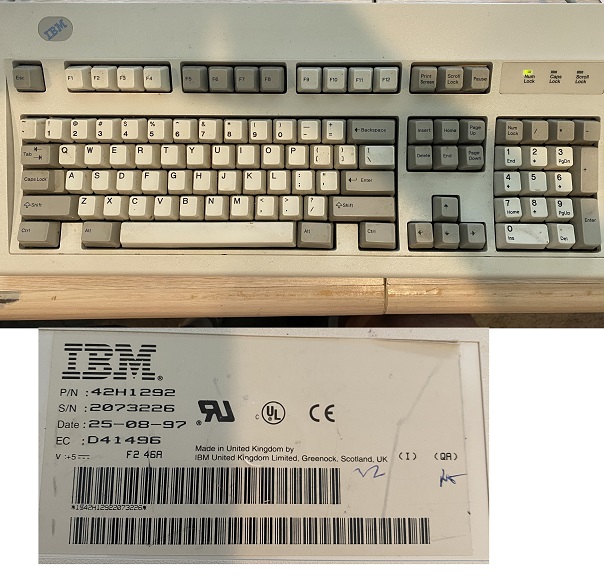
Hello, I’m DMP and I am new to this site and I’m really not sure this is where I should be. I started out as a keypunch operator many years ago. I have an IBM Model M keyboard that I have had since the 70’s and I want to keep using it on windows 11. Most of you probably don’t even know what a keypunch operator is. Well it’s what data entry operators were called in the beginning.
I have used this keyboard for so long, and it still works. I want to use it on my PC that has the new windows 11. I know how to change the 10 key to the phone layout, and the pause key changed to the windows key. The problem I have is getting the windows key to act like it is being held down and keying an ‘r’ or ‘e’ etc.
So if I am in the wrong place I apologize, if I am in a place that someone can help me I would really appreciate it.
This could definitely be the right place, although you may have something even older than the Model M if it’s from the 70s!
There are dedicated vintage keyboard communities, but this one has some knowledgeable people who might be able to help and who would know where to send you if we don’t.
Could you tell us the exact model of keyboard you’re trying to adapt, and if there’s no good labeling, a few pictures of the keyboard and the connector at the end of the cable would be helpful.
Okay, so the specific one you’ve got there is a fairly recent one, dating from the mid 90s, but the same basic design and identical technology to ones from a decade earlier. I believe that particular model uses a PS/2 port on a permanently attached cable. I have a similar model using an external converter based on Soarer’s design but using a newer firmware. The main change I’ve made is mapping right Ctrl to be a Win key, and it works perfectly normally.
Do you have a converter already, or are you using something in Windows to remap your numpad and pause key?