In my opinion (and not only mine), SA is a “nonsense profile”. I admire that it is big and thick but it has originally been designed to be mounted on switches with angled stems, like the MicroSwitch SDs or angled Alps SKFF, it they are tilted 11° or so, then they actually work pretty well. Their ergonomy on a regular (modern) keyboard is not that good.
3 Likes
Mostly for interesting trivia; I’m not 100% sure it’s directly the same tooling, but one version of the normally-mounted Atari 800XL used a keyshape practically identical to R3 SA:
16 Likes
That’s cool to see. I love this supply chain detective work. lol
Do we know if SP or Comptec ever had contracts with Atari?
3 Likes
bruh bring back that grit
1 Like
I’ve had this Modern Materials set for a while now but finally decided to mount it.


Still here. Just not doing much. I feel like I’m forcing myself to eat even though I’m nauseous. 
14 Likes
That looks really good.
3 Likes
insert that one spongebob clip MY EYES!
2 Likes


Almost got my F1 sorted out now! Gonna stick with the Gateron UHMknowns as they sound lovely in this chassis. Then GMK Hineybeige with the 2002 kit from GMK Beige Add-on is gonna stay on this board for awhile. But right now I am still running it with hotswap PCB & full alum plate which is gonna get changed drastically when the parts I ordered last night & today come in. I got 2 H87nu PCBs, 2 Geon Fly daughter boards, & 2 EZmate to JST 150mm cables ordered. So I can build it plateless & not have to worry about if the USB port will hang up on the case with all the movement a plateless build will allow.
12 Likes
TX. Nice
3 Likes
I was getting frustrated with MTNU profile, as I sometimes do 
I don’t like how it forces me to change the way I type to feel comfortable and confident in my key presses.


I swapped out my Seneca caps with GMK oblivion. Quick snaps, not the best quality, but I haven’t seen anyone post a Seneca without its default keycaps, so here ya go. I’ll be trying out several different profiles to see what’s most comfortable for me on this board. I’ll post more when I swap
16 Likes
Do you find you have to adjust more with MTNU than when you switch between other profiles? I stll haven’t tried MTNU. It looks great, but since I’m slowing down on buying caps and am on a DCS train, I just haven’t tried yet.
2 Likes
Yes I do have more trouble adjusting to MTNU than many other profiles. I think my main issue is not just the sculpt but the dish shape. It just never feels natural to my fingers when I type in my normal way. I’ve not had this issue on other profiles. Must be something about the angle of my board and the angle at which I hold my hands. I do really like the way they look. Just cannot seem to type fast and consistent on MTNU. But that’s okay, I don’t really have to type fast all the time.
3 Likes
I got used to MTNU and it works out for me now, but still, after trying a lot of different profiles, I always come back to the traditional cherry profile. If MT3 wasn‘t that tall…
4 Likes
While Cherry profile will forever be my fav MTNU is a close 2nd for me. I didnt have any issues swithcing between Cherry & MTNU profile. I’m sure I dropped a few WPM compared to Cherry when I first used MTNU. Although I’d say in no more than a day or two was I back up to speed it felt like. It’s gonna be different strokes for different folks, as Pixel said it took him some time to adjust. But for me MTNU feels like a spherical Cherry profile would be the best way to describe it. There are some differences in feel, but the height & spacing felt perfect right off the bat to me.
I agree its a tough call to spend the cash for a set when you haven’t tried it yet, but if you like Cherry profile I feel like buying MTNU without trying it is not a terrible ideal. Also it seems to hold its value well so worst case you’d probably recoup 95% your cost sellig it off 2nd hand like new.
4 Likes
I’ll throw-in my experience since I also use MTNU a lot; like Rob, it’s probably my second-favorite profile after Cherry for actual use. Also like Rob, coming straight from Cherry, it does take a day or two for me to get back-up to speed and does entail some adjustment - but I’ve also gotten some of my best typing scores with MTNU. Both keyboards currently in my daily-driver rotation have MTNU sets on them.
I will say going back to Cherry doesn’t take as much adjustment time for me; whether that’s raw long-term familiarity or something I find more inherently intuitive about the shape I can’t say - but that’s why Cherry is still No. 1 for me. I do think it’s probably a little easier to feel your way around with Cherry unconsciously; it’s less my raw speed and more my accuracy that takes a temporary hit when moving to MTNU from something else. (I also love MT3 and its deliciously-deep scoops but find it too tall, aside from some other QC issues like oft-warped spacebars.)
All factors considered (including aspects of manufacturing, aesthetics, and durability beyond just shape), I’ve yet to encounter a truly perfect profile example - but MTNU as made by GMK is definitely on the podium for me in that regard. I love the look and feel, and the legend quality is fantastic - like genuinely exceptional. Makes MT3 or HSA look downright clumsy in comparison.
On the other hand, the sprue marks are somewhat prominent on the back side, and the surfaces are prone to texture alteration that isn’t the same as but visibly adjacent to traditional shining - seems to happen with contact or abrasion from fingernails more than oils so far. If you’d normally choose a PBT set for their resistance to visual wear, MTNU unfortunately does not share the same resilience with classic thick dye-sub sets, and lies somewhere in-between those and quality ABS in that regard. That said, they are probably the most precisely manufactured doubleshot PBT keycaps I have ever seen, with the most nuanced texture and cleanest legends.
Not perfect, but truly excellent.
5 Likes
The more I use MTNU, the more I do find I enjoy it. I just wish there were in stock black blanks I could get ahold of at lower prices. The main things that keep me from experimenting more with MTNU is the steep price and limited color ways. The feel itself is pretty great.
6 Likes
I think maybe I use more of the pads of my fingers, and less of the tips, than some people. It’s mostly because I’m a musician and that’s how I learned to play both clarinet and guitar. So for me, MTNU dish doesn’t really cup my fingers so much as the bottom edge of the scoop gets in the way. I don’t have this problem with other spherical profiles like DSA, SA, or MT3. I certainly can type with MTNU, just never as fast and comfortably as other profiles.
4 Likes
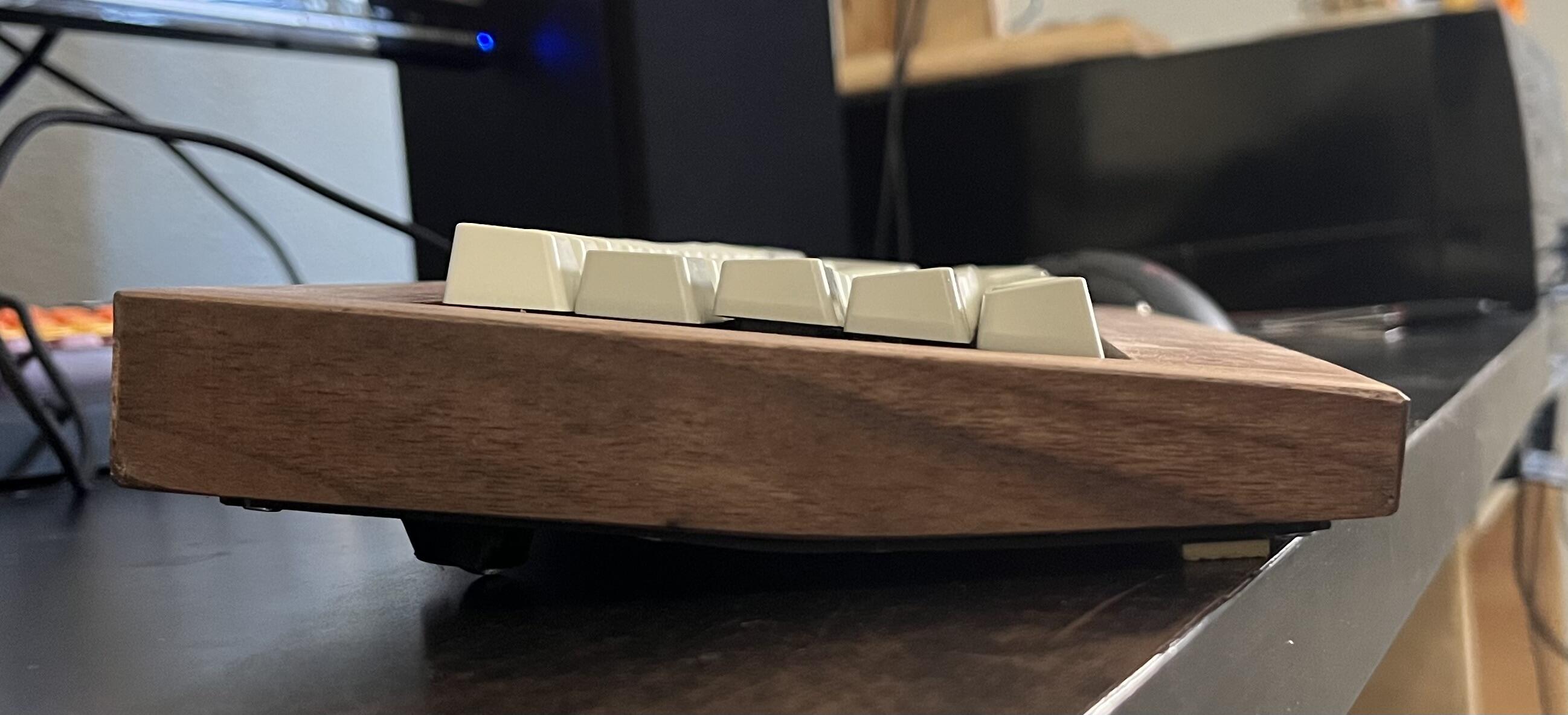
Annnnd we’re done, hardware-wise, pending various upgrades and fixes that may or may not happen. I think porting to VIAL will need to be done, because I’m realizing that contrary to what I thought, I may use RShift enough not to want it permanently remapped to the up-arrow, and also I just kinda want to learn how to port to VIAL. I also have four more of these busted-ass PCBs, and the rest of them are probably going to be MX switches in 3D printed cases, though there’s no reason I couldn’t trade this assembly out for another one down the road.
The typing experience is really pretty decent. I used a 1.5mm ABS sheet that was flexible enough to curve around the bottom, and I screwed it to the wood in about a million places. The feet are mounted to this, so there’s an inherent (but slight) bouncy effect, which is appropriate because it also visibly looks like a trampoline or pro wrestling mat . The plate is held against the case by wooden “cleats,” and I removed one screw when the initial fit felt a little too stiff. I also removed the collar for the spacebar’s post stabilizer, and I think that helped with feel, at the cost of additional wobble. Binding is possible on the spacebar but not bad at all. The sound is typical “ALPS clicky” and not unpleasant at all, though the stabs do rattle. The CapsLock key may be warped, but it’s more likely that I let it get away from me a bit when soldering the switch.
I’ve talked about the other successes and oopsies of building it in the workbench thread, but overall I’m pleased.
EDIT: I’m not entirely sure how I did it, but I managed to get VIAL working. I added a tap-dance to make my combined CapsLock/“Fn” work together better, and I was able to fine tune the hold-timing on Up/RShift to make it more usable than the default on VIA. TBH, setting up either of these seems more convoluted than it needs to be for a board that’s already running QMK, but I’m sure there are factors I’m not able to see.




13 Likes
You’re all are definitely talking me into giving MTNU a try sometime! (But I also might type more on the pads of my fingers from my nails and, funnily enough, playing the clarinet). Maybe I’ll dig out my sets and see what I’m willing to part with to make some room!
1 Like