I waited over 10 years for a Dune themed keycap set. But this is not it for me
Hmm

I waited over 10 years for a Dune themed keycap set. But this is not it for me
Hmm
Yeah, that has a lot going on and is a bit of a mess.
I think that also summarizes the whole series after Dune Messiah.
SO… MANY… DUNCANS.
There’s a lot there that I wouldn’t have taken to IC, much less to market.
I don’t hate the colors, but everything else…woof.
Yeah that set is all over the place, wonder why they put this of all designs right in to production?
This is exactly it!
@Rob27shred @fatalruin We’re moving most of our “higher end customs” back to JST. But if you bend the pins, you have to buy a new PCB. All of our PCBs are flashed and tested from the factory, so we know the JST ports have straight pins when we ship them out.
We moved to EZMate because for some of our products (Bakeneko series, Brutal V2 series) - it would often be someone’s first board, and they’d put the JST cable in the wrong way, and bend pins, then demand a replacement PCB. Even if it was their fault, we’d often replace the PCB because when someone complains publicly about a vendor, the vendor usually loses. We thought moving to EZMate would improve the experience for all parties. Easier for customers to build with, easier for us to avoid replacements that aren’t really our fault.
Our Bastion series of PCBs all use EZMate as well - this is due to the height. EZMate is shorter than a hotswap socket, so it can fit into pretty much any board, but JST-SH needs a specific cutout.
We’re also considering swapping to JST-ACH cables for our EZMate boards. JST-ACH and EZMate are compatible, it just seems the JST-ACH connectors hold up a bit better. They aren’t rated for any certain number of mating cycles, similar to JST-SH, but in my testing seem to last longer.
Anyways - it seems that nowadays people’s first boards are NEOs or Rainy75s. We’ll still use EZmate on some of our boards, depending on constraints, but will prefer JST for higher end stuff.
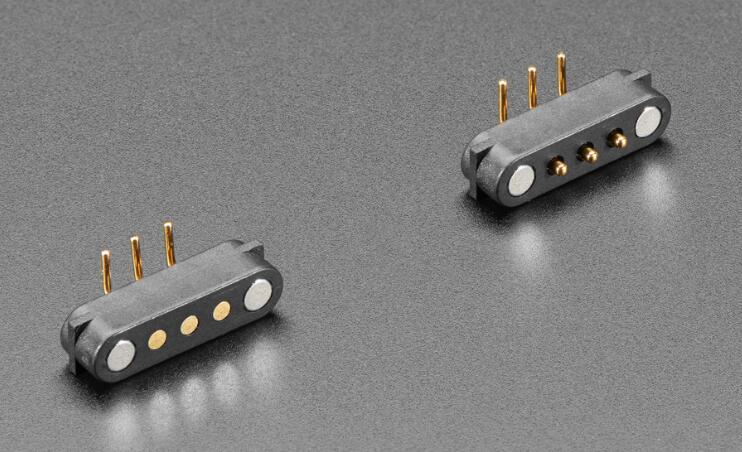
I recently assembled a board from QwertyKeys that used a mag connector and I have to say, I absolutely love that. These offer the ability to do many re-assemblies; if setup correctly, then the connector will never be in the wrong orientation; and generally speaking it was just kind of a neat feature.
That said, I recognize the size impacts packaging. For the board I was building (QK101), it didn’t have a negative impact that I could tell.
Found out today while rebuilding my wired Neo80 to hand-off to one of my nephews that VIA webapp no longer recognizes the board. Tried to update the firmware but QMK Toolbox doesn’t recognize the MCU. AFAIK first version of Neo80 PCB used STM32 which is not even listed so can’t flash firmware either.
Now thinking:
Could be both. Next I’m going to try lookup and short MCU pin out to trigger DFU firmware update. This post is to check if others had similar experiences.
UPDATE: It could be related to Apple Silicon (using M4) or macOS version (using latest) as the last time I used VIA to reconfigure Neo80 was on an Intel Mac I think.
UPDATE2: Confirmed. Tried an MBP w/Intel chip to configure Neo80 with VIA and it worked flawlessly.
Ahh, thanks for the explanation @Upas! Yeah I get it is a tough situation between the two cause if EZmate had a better cycle rating it would definitely top JST SH in my book. It is a very convenient connection & pretty user friendly. Just that 10 swap rating cycle kills anything it has going for it. Overall I won’t hold it against a board that uses EZmate, just will have to be super careful on the amount of times I connect/disconnect either end on any of my future boards that may use it. Although JST ACH sounds interesting for sure, if it can take more cycles than EZmate that might be the way forward!
File a bug with Via? I bet you’re not the only one in that situation
I have the same issue on Windows with the Apollo PCB that came with my F1-8X v2
The hotswap version? I got the 7u hotswap (non RGB) & it shows up with the web app on windows for me. That is so strange how picky PCBs can be LOL! I can send the JSON I used to get it recognized if you need it.
Yes, I have exactly the same PCB.
Don’t know what is happening.
As I don’t program anything on a TKL I have not real need of VIA but it bothers me…
Pretty sure you know this already, but have you tried uploading the JSON to the web app? IIRC I had to do that to get it to actually show up. It’ll show up in the “authorize device” list but won’t do anything when selected until you upload the JSON file. So many PCBs just rely on the sideloading function anymore without ever even trying to get whitelisted, it’s super frustrating & borderline false advertising if you promote it as VIA compatible IMHO. If you do need the file I think I can send it to you on here in DMs or could just email you it if not, just let me know.
I thought that it would be recognized as this, but you are right.
We’re can I find the JSON file ?
Download the zip file for the last option (Apollo87HL-T by Gondolindrim), it’ll have the BIN file & JSON file but you’ll only need the JSON file.
EDIT: You shouldn’t need to flash the JSON to the PCB if it works already so ignore the instructions about that. You should just need to upload it to the draft definitions in the design tab on VIA. Then authorize it again & it should actually show up after that.
Thank you, I’ll try the JSON file this Monday!
It works, thank you so much !
Awesome, glad I could help! I really wish a lot of these PCBs would get whitelisted so they just show up on VIA when plugged in & selected. Having to side load the JSON kinda deafeats the whole point of VIA LOL!